
Accounts Payable Automation in Australia: How Finance Teams Eliminate Manual AP Processing (2026 Guide)
Ordron25 min read
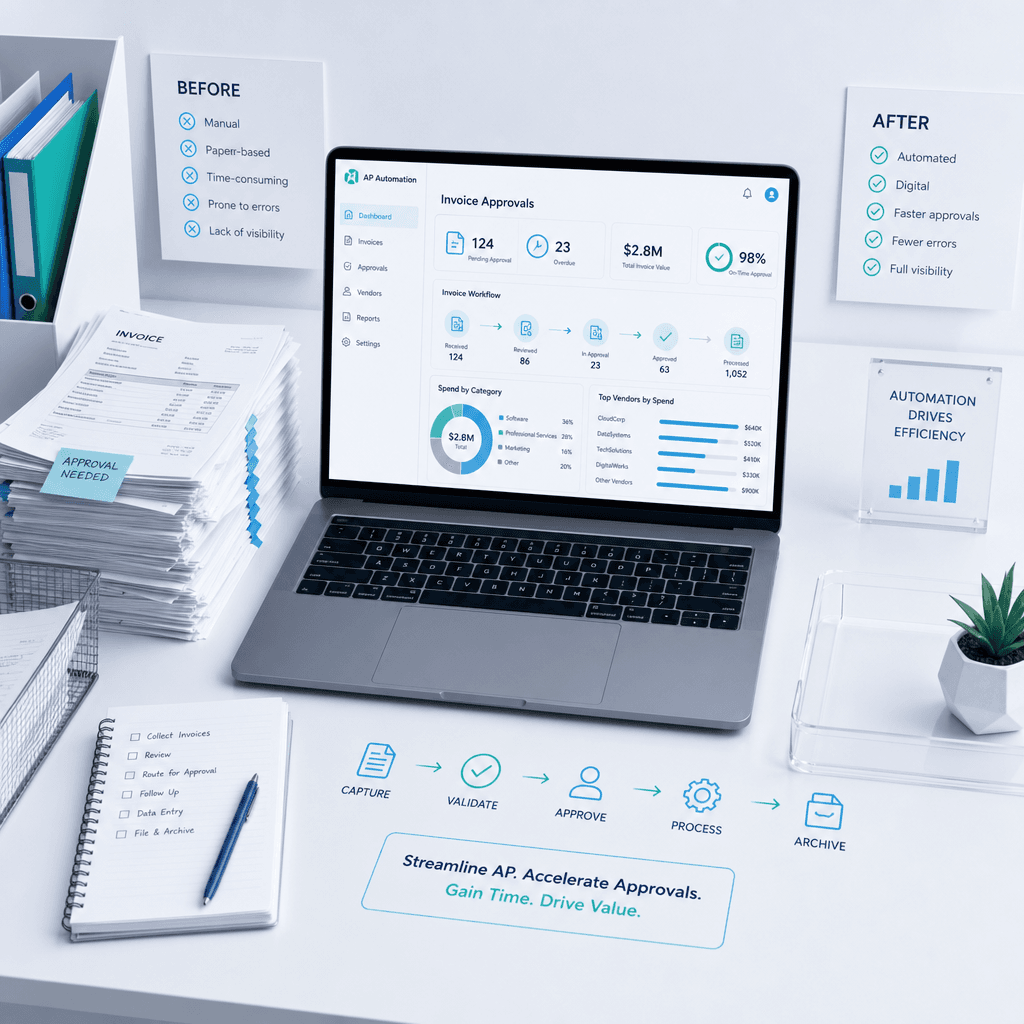
If your finance team is still manually keying supplier invoices, chasing approvers by email, and exporting ABA files from a spreadsheet, the cost is not abstract. It shows up as late payment penalties on supplier statements, as early-payment discounts that expire before the invoice clears your inbox, and as FTE hours that could be allocated to analysis being consumed by data entry. For teams processing more than a few hundred invoices per month, the cumulative drag on cash flow, accuracy, and staff time is significant and entirely addressable.
This guide covers the full accounts payable cycle, not just invoice capture. We will walk through PO and receipt matching, multi-tier approval workflows, exception handling, ABA file generation, supplier onboarding, GST coding accuracy, and the audit trail requirements the ATO expects. We will also separate AP automation from invoice OCR, which is a distinction that matters because OCR alone does not close the loop on a single invoice. The work described here is the kind that ships with numbers attached, measured after go-live, not aspirational projections built from vendor demos.
The outcomes referenced throughout this guide come from work we have shipped with Australian businesses across logistics, distribution, and manufacturing. The metrics are recorded post-implementation. Where the numbers sound significant, they are because the problem was significant before the automation ran.
Key Takeaways
- Manual AP processing carries hidden costs beyond staff time: late payment penalties, lost early-payment discounts, and elevated fraud exposure.
- AP automation covers the full cycle from PO creation through to ABA payment file generation, not just invoice scanning.
- 3-way matching (PO, invoice, goods receipt) can be automated to flag only genuine exceptions for human review, which is where the efficiency gains are largest.
- Australian-specific requirements including ABA file formatting, Peppol e-invoicing, and ATO-compliant audit trails are all addressable within an automated AP build.
- Coding accuracy above 95 percent and processing time reductions of 65 percent or more are achievable without replacing legacy ERP systems.
- Clean supplier master data and structured change management are the two factors most likely to delay or limit outcomes during implementation.
Summary Table: Manual AP vs Partial Automation vs Full AP Automation
| Dimension | Manual AP | Partial Automation (OCR only) | Full AP Automation |
|---|---|---|---|
| Invoice capture | Manual keying | OCR extracts data | OCR + validation + coding |
| 3-way matching | Spreadsheet or visual check | Not included | Automated PO/invoice/receipt match |
| Approval workflow | Email chain | Email chain | Rules-based multi-tier routing |
| Exception handling | Ad hoc, slow | Ad hoc, slow | Auto-routed to correct reviewer |
| ABA file generation | Manual export | Manual export | Automated batch generation |
| GST coding accuracy | Human-dependent | Human-dependent | Rules + ML, auditable |
| Audit trail | Partial, manual | Partial | Full, timestamped, ATO-ready |
| Fraud controls | Limited | Limited | Duplicate detection, bank detail alerts |
| Hours per 1,000 invoices | 40-80 hrs | 20-40 hrs | 5-12 hrs |
| Implementation dependency | None | Low | Supplier master data, ERP access |
What AP Automation Actually Covers (and What It Does Not)
This is the distinction that saves finance teams from expensive disappointment. Invoice OCR, which is the technology that reads a PDF and extracts field values like supplier name, invoice number, ABN, and amount, is a single component of AP automation, not the whole thing. A team that buys an OCR tool and calls the problem solved still has approval routing happening over email, still has a staff member manually matching the extracted invoice data against a PO, and still has someone building the ABA payment file from a spreadsheet.
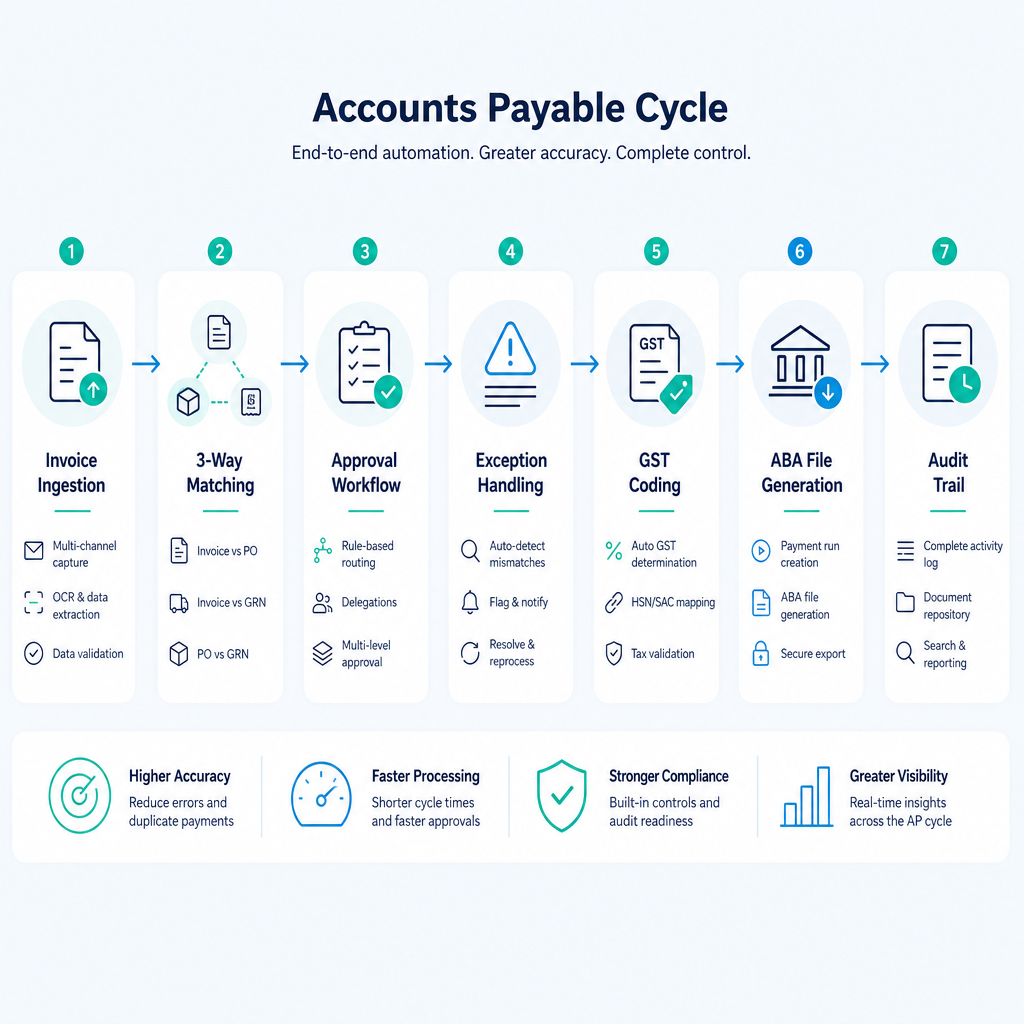
Full AP automation covers the end-to-end cycle:
Invoice ingestion: Structured capture of invoices arriving by email, PDF, EDI, or Peppol network. This includes OCR and intelligent document understanding for unstructured formats, plus validation of ABN, GST registration, and duplicate detection at the point of entry.
3-way matching: Automated comparison of the supplier invoice against the originating purchase order and the goods receipt or delivery confirmation. Where all three align within defined tolerances, the invoice proceeds without human touch. Where they do not, it routes to the correct exception handler with the discrepancy flagged.
Multi-tier approval workflows: Rules-based routing based on cost centre, amount threshold, department, supplier category, or any combination of these. A $2,000 office supplies invoice routes differently from a $150,000 freight invoice. Approvers act within the system; the audit trail captures who approved what and when, with timestamps.
Exception handling: The majority of efficiency loss in manual AP sits in exceptions: invoices where the PO number is missing, where the quantity does not match, where the supplier has updated their bank details. Automated exception handling routes each case to the right person with the context they need to resolve it, rather than letting it stall in an inbox.
GST coding and GL allocation: Automated assignment of GST treatment and GL account codes based on supplier, category, or line item rules. This is where coding accuracy above 95 percent becomes achievable, and where the ATO audit trail starts to have real integrity.
ABA file generation: The Australian Banking Association payment file format is the standard for batch EFT payments to supplier bank accounts. Full AP automation generates the ABA file from approved invoices automatically, ready for upload to the business's bank portal, without a staff member manually building it.
Supplier self-service and onboarding: A structured supplier portal where new suppliers submit their ABN, bank details, and payment terms directly, with validation checks run at the point of submission. This removes the phone-and-email process of collecting supplier data and reduces the risk of bank detail fraud.
Audit trail and archiving: Every action in the AP cycle, from invoice receipt through to payment confirmation, is logged with timestamps, user IDs, and the data state at each step. This is the record the ATO expects if a GST input tax credit is queried.
The Full AP Cycle: Before and After Automation
To make this concrete, consider a mid-sized Australian distributor processing 1,500 invoices per month across multiple cost centres. Before automation, the cycle looks like this: invoices arrive by email to a shared inbox, a staff member downloads each PDF, keys the data into the ERP, prints the invoice, walks it to the relevant manager for approval, follows up by phone or email when approvals stall, re-keys the approved amount into a payment spreadsheet, builds the ABA file manually, and files the paper invoice in a physical folder. The audit trail is a folder of printed PDFs with handwritten signatures.
After automation, invoices hit the shared inbox and are captured automatically. The system reads, validates, matches against the PO register, codes to the correct GL account and GST treatment, and routes for electronic approval to the right approver based on the rules configured at setup. Approvers receive a notification with the invoice, the matched PO, and the delivery confirmation alongside it. They approve or query in the system. Approved invoices batch into an ABA file on the agreed payment run schedule. The audit trail is timestamped, searchable, and exportable for the ATO without any manual assembly.
The hours difference across 1,000 invoices is typically 40-80 hours for a fully manual process down to 5-12 hours with full automation. The 5-12 hour range accounts for the exceptions that still require human judgement, because no automated system eliminates every edge case. What it does is ensure that human effort is concentrated only on the cases that require it.
3-Way Matching: Where the Real Efficiency Is
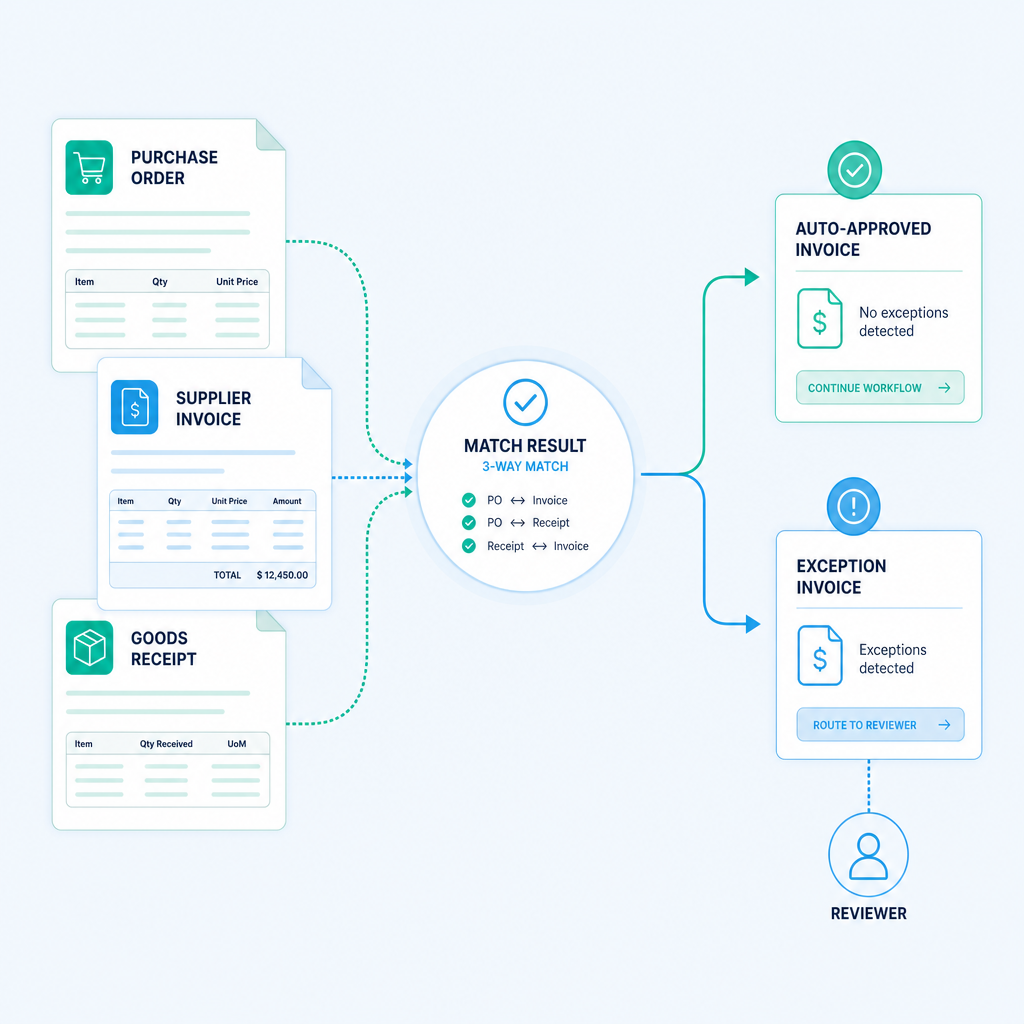
If there is a single automation component that delivers the most measurable impact for high-volume AP teams, it is 3-way matching. The reason is that matching is where human error concentrates and where the volume of touches per invoice is highest. A staff member matching manually is cross-referencing three documents, often across two or three different systems, and making a judgement call on whether a $12.40 quantity variance is within tolerance or needs escalation.
Automated 3-way matching sets the tolerance rules once, applies them consistently across every invoice, and routes only the genuine mismatches to a human reviewer. In a large distribution enterprise processing thousands of invoices monthly, we found that more than 75 percent of invoices processed without any human touch once 3-way matching was in place. Coding accuracy exceeded 95 percent. Invoice processing time fell by 65 percent. The finance team's effort shifted from touching every invoice to resolving a curated queue of real exceptions.
The mechanics matter here. The automation needs access to three data sources: the PO register (usually in the ERP), the invoice data (captured via OCR and validated), and the goods receipt or delivery confirmation (often in a warehouse management system or a signed delivery docket). The integration architecture depends on what systems are in place. In some builds, this means API connections between modern systems. In others, it means RPA driving legacy interfaces directly.
On the question of legacy systems: the prevailing assumption in the market is that meaningful AP automation requires a modern ERP or a system replacement as a prerequisite. That assumption is wrong, and it is costing Australian businesses years of delays. I have run automation on a twenty-year-old ERP with no APIs. The RPA bot drives the legacy interface exactly as a human would, validates the extracted data against SQL, and syncs clean records into the downstream reporting environment. The ERP was never touched. The 160-plus hours per month of manual bridging work was eliminated. The infrastructure constraint changes the tooling choice; it does not change the standard of outcome.
Multi-Tier Approval Workflows and Exception Routing
Approval workflows are where AP automation intersects most directly with organisational structure, and where the configuration work matters most. A workflow that routes every invoice to the same approver regardless of amount or department is not an improvement on email; it just moves the bottleneck into a different interface.
Effective approval workflow automation starts with a routing logic map: which invoice types go to which approvers, at which dollar thresholds, in which sequence, and what happens if an approver does not act within a defined timeframe. Escalation rules matter. If a $90,000 invoice sits unactioned for 48 hours because the primary approver is travelling, the workflow should escalate to a nominated delegate automatically, with a record of the escalation in the audit trail.
For Australian businesses with multiple cost centres, depots, or subsidiaries, multi-tier routing handles the complexity that makes manual AP so slow. A national logistics provider we worked with was processing AP across multiple depots using a SharePoint-based workflow. Each batch was taking approximately four hours to move from document capture through to filed and coded. We plugged OCR and workflow logic directly into the existing SharePoint process. No new software was introduced. Filing became 100 percent automated and coding was handled inline. The AP cycle time dropped from four hours to fifteen minutes per batch. The improvement came from the exactness of the intervention, not from deploying a more sophisticated platform.
ABA Files, Supplier Payments, and Fraud Controls
The ABA file format is specific to Australian banking and is the mechanism by which businesses submit batch EFT payments to their bank for processing. Most AP automation platforms in the Australian market support ABA file generation natively, or it can be built into a custom workflow. The output is a formatted text file containing BSB numbers, account numbers, payment amounts, and reference fields, ready for upload to the business's online banking portal.
The fraud risk associated with supplier payments is not theoretical. Authorised push payment fraud, where a supplier's bank details are fraudulently changed before a payment run, is the most common AP fraud vector for Australian businesses. The ACCC's Scamwatch data consistently shows business email compromise as a high-value fraud category, and the AP payment run is a primary target.
Automated controls that reduce this risk include:
- Bank detail change alerts: Any update to a supplier's bank account details triggers a hold and a verification workflow before the change is approved and applied to the payment file.
- Duplicate invoice detection: The system flags invoices with matching invoice numbers, amounts, or supplier-date combinations before they reach the payment stage.
- ABN validation: Invoice ABNs are validated against the Australian Business Register at ingestion, catching invoices from deregistered or fraudulent entities early.
- Segregation of duties: The person who approves an invoice cannot also be the person who releases the payment file, with the system enforcing this rule rather than relying on policy.
These controls are not available in a manual AP process without significant overhead. In an automated process, they run on every transaction without additional effort.
Peppol E-Invoicing and ATO Compliance in 2026
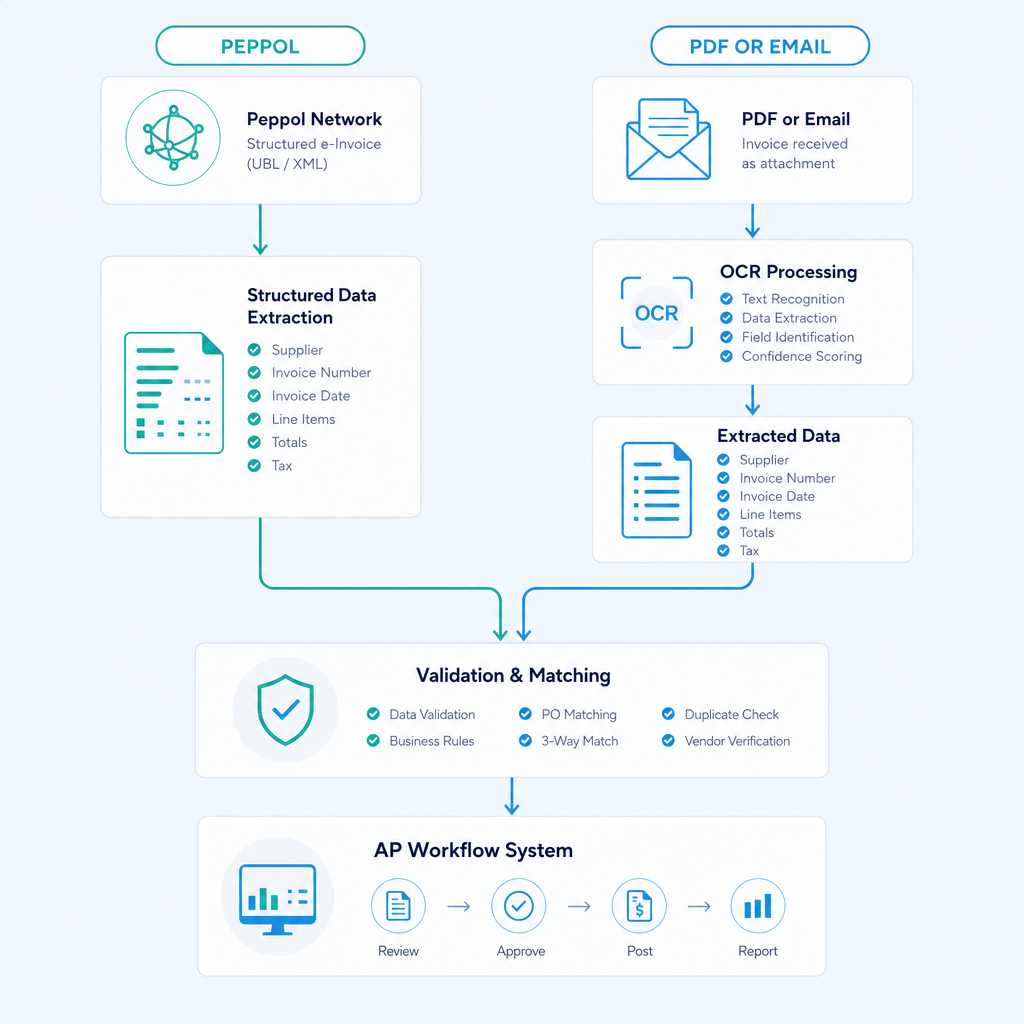
Peppol is the international e-invoicing network that the Australian government has progressively encouraged through the ATO's e-invoicing programme. Under Peppol, invoices are transmitted as structured data directly between the supplier's and buyer's accounting systems, bypassing PDF and OCR entirely. The ATO's position is that Peppol e-invoicing is the preferred format for business-to-business invoicing in Australia, and government agencies are required to receive Peppol invoices.
For AP automation builds in 2026, the Peppol question is increasingly relevant for businesses that deal with government entities or large corporates that have enabled Peppol sending. Where a supplier sends via Peppol, the structured data arrives pre-validated: no OCR required, no field extraction errors, no GST coding ambiguity. The invoice data maps directly into the AP workflow.
For suppliers not yet on Peppol, OCR and intelligent document understanding remain the ingestion layer. A well-built AP automation system handles both channels, applying the same validation, matching, and routing logic regardless of how the invoice arrived.
ATO audit trail requirements for GST input tax credits require that a business can demonstrate: the invoice was a valid tax invoice, the GST was correctly coded, the payment was made, and the record is retained for five years. An automated AP system with timestamped logging of every action, including the GST coding decision and the approval chain, meets this requirement more reliably than a folder of PDFs with handwritten signatures.
GST Coding Accuracy and GL Allocation
GST coding errors in AP have a direct financial consequence. An invoice miscoded as GST-free when it should carry GST means an input tax credit claim is either missed or overstated, both of which create compliance risk at the next BAS. For high-volume AP teams touching hundreds or thousands of invoices per month, even a 2-3 percent coding error rate across a large invoice population adds up to a material GST exposure.
Automated GST coding works by applying supplier-level rules (this supplier always invoices for taxable supplies), category-level rules (freight from a registered carrier is taxable), and line-item rules (a disbursement component on a professional services invoice may be GST-free) in combination. Where the system cannot assign a code with sufficient confidence, it routes the invoice to a human reviewer with the ambiguous field highlighted. This is the exception routing approach applied to GST, and it concentrates human review on the cases that genuinely need it.
The accuracy outcome in practice: in the large distribution enterprise referenced earlier, coding accuracy exceeded 95 percent across a high monthly invoice volume. The improvement was not from the sophistication of the ML model; it was from the specificity of the rules configured during implementation, informed by the business's own historical coding patterns.
ROI Snapshot: Hours Saved per 1,000 Invoices
Finance leaders evaluating AP automation need a realistic view of the return. The numbers below are drawn from work we have shipped, not from vendor marketing benchmarks.
| Activity | Manual hours per 1,000 invoices | Automated hours per 1,000 invoices | Hours saved |
|---|---|---|---|
| Invoice ingestion and data entry | 20-30 hrs | 1-2 hrs | 18-28 hrs |
| 3-way matching | 10-15 hrs | 0.5-1 hr | 9.5-14 hrs |
| Approval chasing and follow-up | 8-12 hrs | 0.5-1 hr | 7.5-11 hrs |
| Exception resolution | 5-8 hrs | 2-3 hrs | 3-5 hrs |
| GST coding and GL allocation | 6-10 hrs | 0.5-1 hr | 5.5-9 hrs |
| ABA file preparation | 3-5 hrs | 0.2-0.5 hr | 2.8-4.5 hrs |
| Filing and audit trail maintenance | 4-6 hrs | 0.1-0.2 hr | 3.8-5.8 hrs |
| Total | 56-86 hrs | 4.8-9.7 hrs | 51-76 hrs |
At an average loaded cost of $65-85 per hour for a finance team member, 1,000 invoices per month represents a potential saving of $39,000-$77,000 per year in staff time alone, before accounting for late payment penalties avoided, early-payment discounts captured, and fraud prevented. Teams processing 3,000-5,000 invoices per month see proportionally larger returns.
The implementation investment for a mid-market AP automation build in Australia typically ranges from $20,000-$80,000 depending on complexity, with an ongoing licence or maintenance cost of $1,000-$4,000 per month. Most implementations reach payback within six to twelve months at volumes above 500 invoices per month.
Implementation Caveats: What Actually Determines Outcomes
Two factors determine whether an AP automation implementation delivers the projected outcomes or falls short: the quality of the supplier master data, and the rigour of the change management process.
Supplier master data: The automation is only as accurate as the data it matches against. If the PO register has inconsistent supplier codes, if ABNs are missing or incorrect, or if the approved supplier list has not been reconciled in years, the matching logic will generate false exceptions at a rate that overwhelms the human review queue. Cleaning supplier master data before go-live is not optional; it is the prerequisite that most implementations underinvest in. Budget two to four weeks for a supplier data audit on any implementation involving more than 200 active suppliers.
Change management: AP automation changes the daily workflow of every person in the finance team, and often the workflow of department managers who approve invoices. Approvers who were sent PDFs by email now log into a portal. Finance staff who owned the end-to-end process now manage a queue of exceptions. Without structured training, clear communication about why the change is happening, and a defined escalation path for the first 30 days post-go-live, adoption stalls and workarounds emerge that undermine the automation logic.
The technology is rarely the failure point. The failure point is almost always one of these two factors, and both are addressable with deliberate planning.
Xero, MYOB, and ERP Compatibility
The most common compatibility question from Australian finance teams is whether AP automation can integrate with their existing accounting platform without replacing it. The short answer is yes, with a caveat about the integration approach.
Xero and MYOB both expose APIs that allow certified integration partners to read and write invoice, payment, and contact data. For businesses on these platforms, AP automation can sync approved invoices and payment records directly into the ledger without manual re-entry. Ordron's bank reconciliation automation for Xero and MYOB covers the downstream reconciliation piece that connects to the AP payment output.
For businesses on older ERP platforms without API access, RPA-based integration drives the ERP interface directly, as described in the logistics operator example earlier in this guide. The integration approach changes; the outcome standard does not. If you are processing invoices on a twenty-year-old system that has not been updated since the Howard government, the automation can still run around it.
For more complex ERP environments, the intelligent invoice multi-split case study covers the specific problem of invoices that need to be split across multiple GL accounts, cost centres, or entities, a scenario that often creates a manual bottleneck even when the rest of the AP cycle is partially automated.
Case Study Outcomes: What the Numbers Actually Show
The enterprise AP with intelligent document understanding case study covers the large distribution enterprise referenced throughout this guide. The build combined RPA with intelligent document understanding to read, PO-match, and code supplier invoices automatically. 75 percent of invoices processed without human touch. Coding accuracy exceeded 95 percent. Processing time fell by 65 percent. The human reviewers' time was concentrated on the 25 percent of invoices that had genuine exceptions requiring judgement.
The logistics AP with OCR case study covers the national logistics provider's SharePoint-based AP process. The intervention was surgical: OCR and workflow logic plugged directly into the existing SharePoint environment. No new software licences were required. The AP cycle dropped from four hours to fifteen minutes per batch. The exact automation shipped was the narrowest intervention that removed the bottleneck, not the most technically impressive option available.
These are the numbers measured after go-live. They are not modelled projections or vendor benchmarks. The difference matters when you are building a business case for your CFO or board.
Choosing the Right Approach for Your Business
Not every AP automation build looks the same, and the right scope depends on the volume, the existing infrastructure, and the specific bottlenecks in your current process. A business processing 200 invoices per month has different priorities from one processing 5,000.
For lower-volume teams, the highest-value interventions are usually approval workflow automation and ABA file generation, because these are where the manual effort is most concentrated relative to volume. For high-volume teams, 3-way matching and automated GST coding deliver the largest returns because they remove the per-invoice human touch at scale.
The question to ask before scoping any automation build is: where does the invoice stop moving in our current process, and why? The answer to that question points to the bottleneck. The automation should be designed around removing that bottleneck specifically, with the metrics to prove it has been removed defined before implementation begins.
If you want to find your automation quick wins before committing to a full build, contact Ordron for a process diagnostic. We map the current AP cycle, identify the highest-impact intervention points, and return a scoped recommendation with estimated outcomes. No aspirational projections, no vendor demos. Just the specific problem, the specific fix, and the numbers we expect to measure after go-live.
References
-
Australian Taxation Office, Tax Invoice Requirements and GST Record Keeping (ATO.gov.au): The ATO's official guidance on what constitutes a valid tax invoice, GST coding requirements, and the five-year record retention obligation for businesses claiming input tax credits. Directly relevant to AP automation audit trail design.
-
Australian Business Register, ABN Lookup (abr.gov.au): The public register of Australian Business Numbers used for ABN validation at invoice ingestion. AP automation systems query this register to verify supplier ABNs against active registrations.
-
Australian Competition and Consumer Commission, Scamwatch Business Email Compromise Data (scamwatch.gov.au): The ACCC's reporting on business email compromise fraud, which includes authorised push payment fraud targeting AP payment runs. Provides the regulatory context for AP fraud controls.
-
Australian Taxation Office, E-Invoicing and Peppol (ato.gov.au/eInvoicing): The ATO's programme documentation for Peppol e-invoicing adoption in Australia, including the requirement for government agencies to receive Peppol invoices and the structured data benefits for AP automation.
-
Ordron Case Study Library (ordron.com/case-studies): Post-implementation outcome data from Ordron's AP automation engagements across logistics, distribution, and manufacturing, including the enterprise AP with intelligent document understanding build and the logistics AP with OCR build referenced throughout this guide. Metrics are recorded after go-live.
-
Australian Banking Association, Direct Entry File Format Specification (ausbanking.org.au): The ABA file format specification governing batch EFT payment submissions to Australian banks, which is the standard output format for supplier payment runs in an automated AP build.
Frequently asked questions
- How much does AP automation cost for an Australian business?
- Implementation costs for AP automation in Australia typically range from $20,000 to $80,000 AUD depending on the complexity of the existing systems, the number of integration points, and the scope of the build. Ongoing licence or maintenance costs range from $1,000 to $4,000 per month. For businesses processing more than 500 invoices per month, payback is typically achieved within six to twelve months through staff time savings alone, before counting late payment penalties avoided and early-payment discounts captured.
- Does AP automation work with Xero and MYOB?
- Yes. Both Xero and MYOB expose APIs that allow AP automation to sync approved invoices, payment records, and supplier data directly into the ledger. For older ERP platforms without API access, RPA-based integration can drive the legacy interface directly without modifying the underlying system. The integration approach adapts to the infrastructure; the outcome does not depend on running a modern ERP.
- How long does an AP automation implementation take?
- A mid-market AP automation implementation typically takes six to twelve weeks from scoping to go-live. The timeline depends heavily on the quality of the supplier master data (allow two to four weeks for a data audit if this has not been done recently) and the complexity of the approval routing rules. Simpler builds focused on a single bottleneck can go live in four weeks. Implementations involving multiple ERP integrations, Peppol connectivity, and multi-entity structures take longer.
- What is the difference between AP automation and invoice OCR?
- Invoice OCR extracts field values from a PDF invoice: supplier name, invoice number, date, amount, ABN. AP automation covers the full cycle from that extraction point through to payment: validation, 3-way matching, approval routing, exception handling, GST coding, ABA file generation, and audit trail maintenance. OCR alone does not route for approval, does not match against a PO, does not generate the payment file, and does not build the audit trail.
- How does AP automation reduce fraud risk?
- Automated AP builds include several fraud controls: bank detail change alerts that hold payments when a supplier's account details are updated until verified, duplicate invoice detection that flags matching invoice numbers or amounts before payment, ABN validation against the Australian Business Register at ingestion, and system-enforced segregation of duties that prevents the same person from approving an invoice and releasing the payment file. These controls run on every transaction without additional effort.
- Does AP automation produce ATO-compliant records?
- Yes, when built correctly. An automated AP system logs every action in the invoice cycle with timestamps, user IDs, GST coding decisions, approval chain records, and payment confirmations. This produces a searchable, exportable audit trail that meets the ATO's five-year record retention requirement for GST input tax credit claims.
- What happens to invoices that do not match the PO or receipt?
- Invoices that fail 3-way matching tolerances are routed automatically to the appropriate exception handler, with the specific discrepancy flagged: quantity variance, price variance, missing PO reference, or delivery not confirmed. The exception handler sees the invoice, the matched PO, and the variance in a single view, which means resolution is faster than in a manual process where the staff member has to locate all three documents independently.
- Is AP automation suitable for businesses with legacy ERP systems?
- Yes. RPA-based automation can drive a legacy ERP interface directly, exactly as a human operator would, extracting and validating data without modifying the underlying system. A logistics operator on a twenty-year-old ERP with no APIs eliminated more than 160 hours per month of manual work through this approach. The ERP was never touched. The constraint changes the tooling choice, not the standard of outcome.
Ordron
Finance automation team, Sydney
Ordron builds the finance automation infrastructure that runs AP, AR, reconciliations and reporting on autopilot for Australian mid-market businesses.
More from the Ordron Insights catalogue
Selected by topic. Updated as the agent publishes.
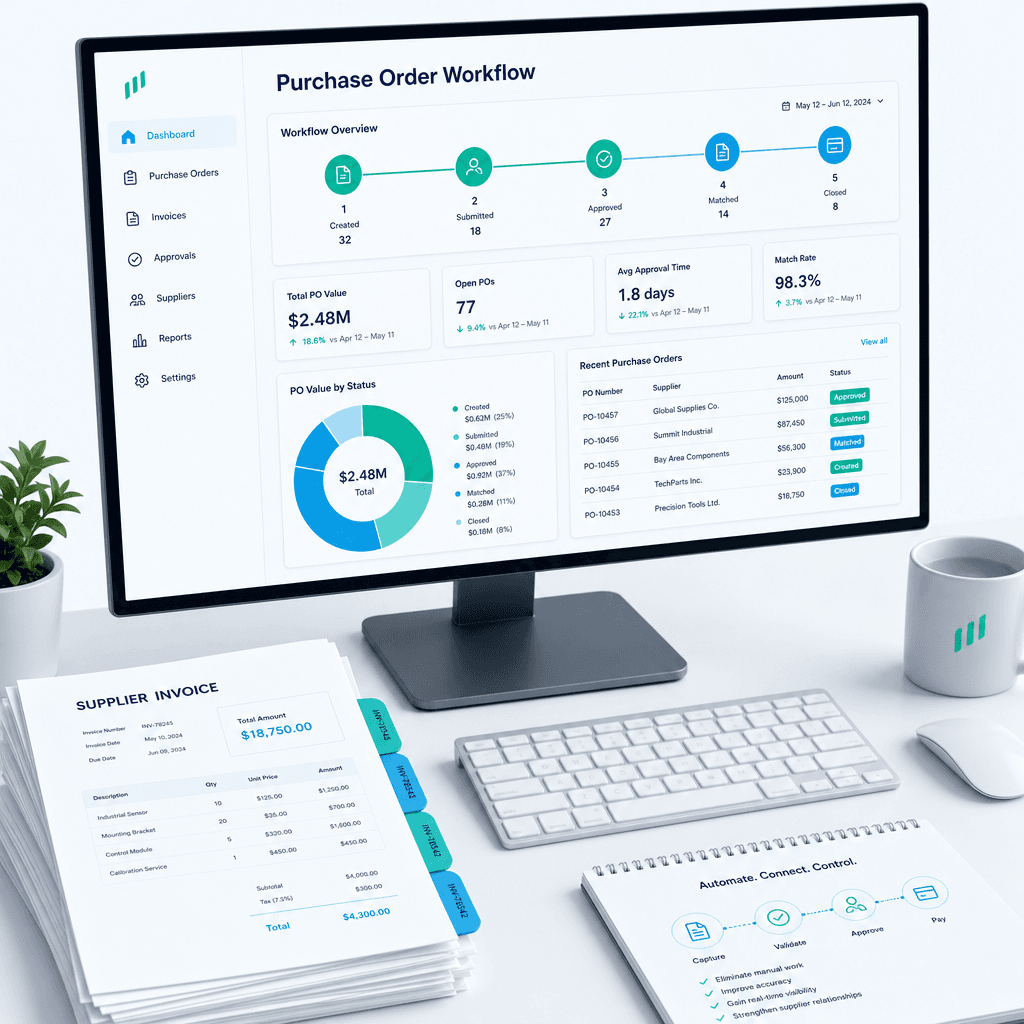
Purchase Order Automation: A Practical Guide for Australian Finance Teams (2026)
If your finance team is still raising purchase orders in a shared inbox, chasing approvals over email, and manually matching invoices line by line before month…
Finance Automation Buyer's Guide for Australian Finance Teams: How to Choose, Scope & Measure Automation That Delivers (2026)
Most finance automation buying decisions are made the wrong way. Teams evaluate vendors on feature lists, watch polished demos, and sign contracts based on…
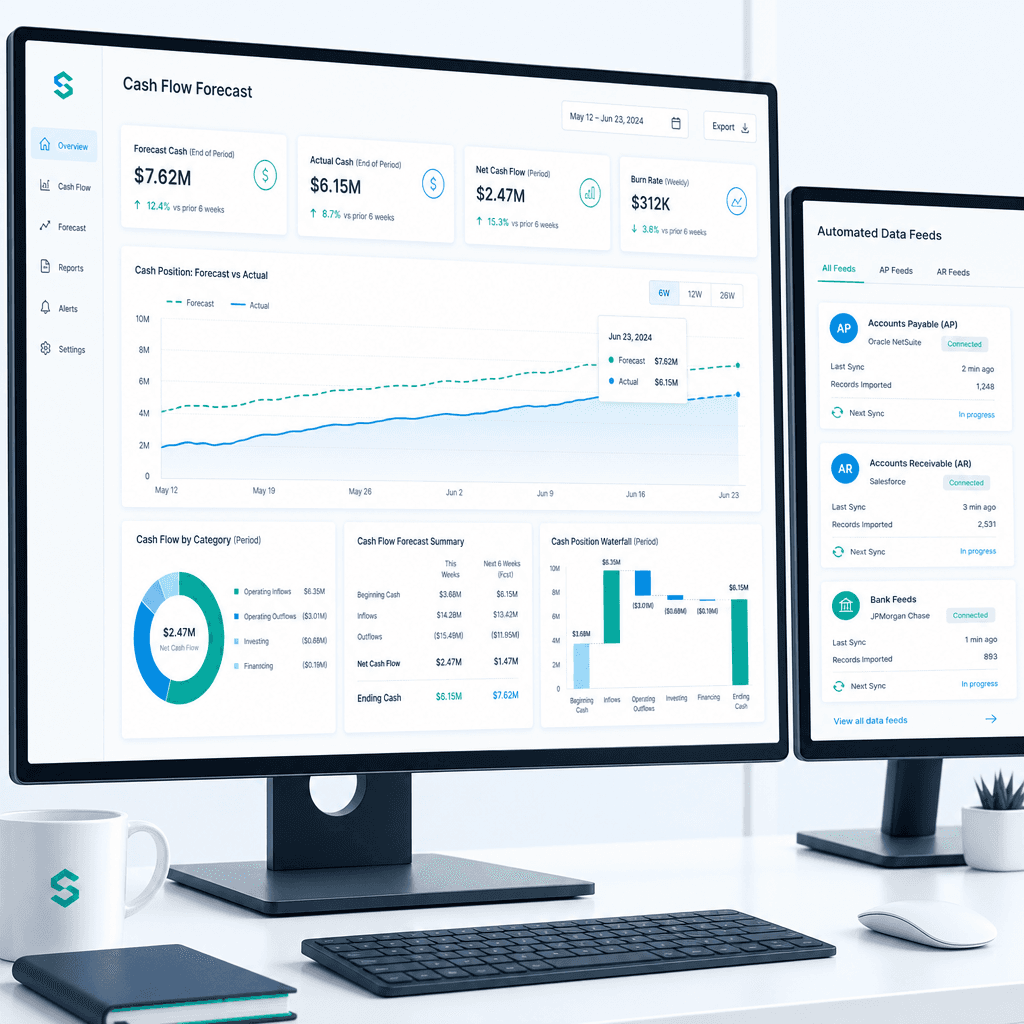
Cash Flow Forecasting Automation: A Practical Guide for Australian Finance Teams (2026)
If your finance team rebuilds the cash flow forecast from scratch every week or every month, you already know where the time goes. Someone pulls an AR ageing…